Flask
Created: 2022-12-16
A python library for web server
Purpose: can parse, or analyze, HTTP request headers and return different pages based on the route.
Requirements
Flask requires our program’s code to be organized in a certain way:
app.py
requirements.txt
static/
templates/
app.pywill have the Python code for our web server.requirements.pyincludes a list of required libraries for our application.static/is a directory of static files, like images and CSS and JavaScript files.templates/is a directory for HTML files that will form our pages.
Setting up Flask Locally
<!DOCTYPE html>
<html lang="en">
<head>
<meta name="viewport" content="initial-scale=1, width=device-width">
<title>hello</title>
</head>
<body>
hello, {{ name }}
</body>
</html>
from flask import Flask, render_template, request
app = Flask(__name__)
@app.route("/")
def index():
name = request.args.get("name")
return render_template("index.html", name=name)
We can change the URL by adding /?name=David
Use GET if u want to include information in URL
Use POST if u want to HIDE information
MVC Paradigm in Flask
Model View Controller (this is a way of thinking and programming.)
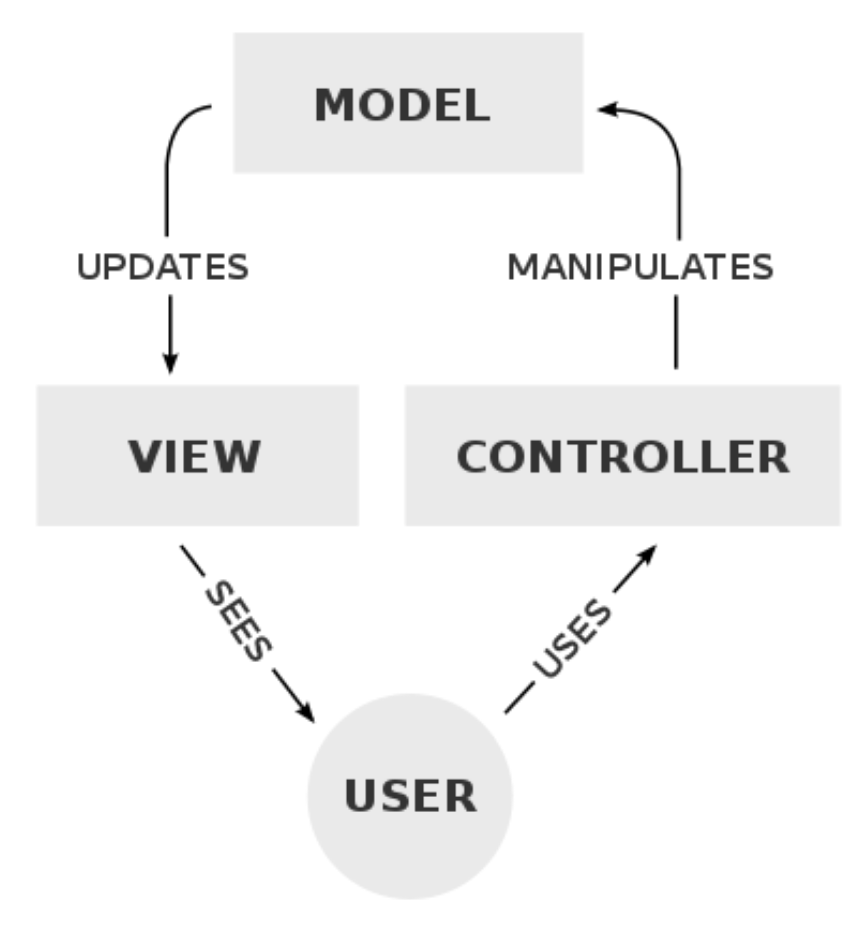
- The MODEL is our application’s data, such as a SQL database or CSV file, which we haven’t yet used.
- The VIEW includes templates and visuals for the user interface, like the HTML and CSS that the user will see and interact with.
- The CONTROLLER contains our “business logic”, code that manages our application overall, given user input. In Flask, this will be our Python code in
app.py.
Cookies (Saving sessions of users)
Sessions are how web servers remembers information about each user,
which enables features like
- allowing users to stay logged in,
- saving items to a shopping cart.
These features require our server to be stateful, or having access to additional state / information.
HTTP on its own is stateless, since after we make a request and get a response, the interaction is completed.
Cookies
It turns out that servers can send another header in a response, called Set-Cookie:
Cookies 101
HTTP/1.1 200 OK
Content-Type: text/html
Set-Cookie: session=value
Then, when the browser makes another request to the same server, it’ll send back the same cookie that the same server has set before:
GET / HTTP/1.1
Host: gmail.com
Cookie: session=value
In Flask, we can use the flask_session library to help manage this for us,
from flask import Flask, redirect, render_template, request, session
from flask_session import Session
# Configure app
app = Flask(__name__)
# Configure session
app.config["SESSION_PERMANENT"] = False
app.config["SESSION_TYPE"] = "filesystem"
Session(app)
Extended Example below
from flask import Flask, redirect, render_template, request, session
from flask_session import Session
# Configure app
app = Flask(__name__)
# Configure session
# It then further configures Flask to store [sessions](https://flask.palletsprojects.com/en/1.1.x/quickstart/#sessions) on the local filesystem (i.e., disk) as opposed to storing them inside of (digitally signed) cookies, which is Flask’s default
app.config["SESSION_PERMANENT"] = False
app.config["SESSION_TYPE"] = "filesystem"
Session(app)
@app.route("/")
def index():
if not session.get("name"):
return redirect("/login")
return render_template("index.html")
@app.route("/login", methods=["GET", "POST"])
def login():
if request.method == "POST":
session["name"] = request.form.get("name")
return redirect("/")
return render_template("login.html")
@app.route("/logout")
def logout():
session["name"] = None
return redirect("/")
Get the value in <input>
For instance, if u want to get the value of month in form
<input type="text" id="month" name="month" placeholder="Month">
Use request.form.get("month")
Example below:
# Implements a registration form, storing registrants in a dictionary, with error messages
from cs50 import SQL
from flask import Flask, redirect, render_template, request
app = Flask(__name__)
REGISTRANTS = {}
db = SQL("sqlite:///froshims.db")
SPORTS = [ "Basketball", "Soccer", "Ultimate Frisbee" ]
@app.route("/")
def index():
return render_template("index.html", sports=SPORTS)
@app.route("/register", methods=["POST"])
def register():
# Validate submission
name = request.form.get("name")
sport = request.form.get("sport")
if not name or sport not in SPORTS:
return render_template("failure.html")
# Remember registrant
db.execute("INSERT INTO registrants (name, sport) VALUES(?, ?)", name, sport)
# Confirm registration
return redirect("/registrants")
@login_required
@app.route("/buy", methods=["GET", "POST"])
@login_required
def buy():
"""Buy shares of stock"""
return apology("TODO")
Notice how most routes are “decorated” with @login_required (a function defined in helpers.py too). That decorator ensures that, if a user tries to visit any of those routes, he or she will first be redirected to login so as to log in.
USING SQL in Flask
db.execute("INSERT INTO birthdays (name, month, day) VALUES (?, ?, ?)", user_name, user_month, user_day)
Transferring the value from python to html
@app.route("/quote", methods=["GET", "POST"])
@login_required
def quote():
"""Get stock quote."""
if request.method == "POST":
lookup_value = lookup(request.form.get("symbol"))
return render_template("quoted.html")
else:
return render_template("quote.html", lookup_value=lookup_value)
For loop in HTML using the values in Flask
{% for sport in sports %}
<input name="sport" type="radio" value="{{ sport }}"> {{ sport }}
{% endfor %}
Redirect to homepage
return redirect("/")